Ditch the spreadsheets and the notebook
An expense logged in seconds.
Logging is finishing a sentence: type the amount, say who it was for and tap Save. The account and the date are already filled in, and the app remembers the category for anyone you’ve paid before.
R$29.90 per yearAbout $10 per yearAbout €8.50 per yearAbout £7.50 per year One payment, no monthly fee.
Demo: a $86.40 grocery expense being logged in 9 taps.
- 9tapsto log $86.40 of groceries
- 3stepsamount, who it’s for and Save
- 0formulasbalance, card bill and forecast come ready-made
Fast because the app remembers
You don’t fill in a form. You finish a sentence, and almost everything is already there.
It’s a sentence, not a form
Choose what happened (I paid, I’ll pay, I received, I’ll receive, I transferred) and fill in the blanks.
Tap the options to see the sentence change:
I paid $86.40 to Groceries for Food with Personal card today
I’ll pay $1,800.00 to Rent for Housing tomorrow
I received $950.00 from Clients as Sales in Work account today
I’ll receive $2,400.00 from Website project as Services on Oct 28
I transferred $500.00 from Work account to Personal account today
Names you’ve used are one tap away
Tap a name you’ve used before and its category comes with it. No retyping.
Account and date already filled in
The sentence opens with the account or card from your last entry and with today’s date.
Installments or a monthly bill? Enter it once
The app creates the installments, up to 60, and the repeats for every week, month or year.
On a computer, type and press Enter
Type the amount straight from the keyboard and press Enter to save.
In a spreadsheet it’s 8 steps. Here it’s 3.
A notebook is quick to write in, but the adding up, the due dates and the “where did it go” are left to you.
In a spreadsheet, on your phone
- 1
Open the file
- 2
Find this month’s tab
- 3
Scroll to the last row
- 4
Type the date
- 5
Type the description
- 6
Type the category
- 7
Type the amount
- 8
Check the total picked up the new row
In FinanceFlow
- 1Amount
- 2Who it’s for
- 3Save
Balance, card bill and forecast updated on the spot.
You log it. The app does the math.
Every entry updates everything on the spot, with nothing else for you to do.
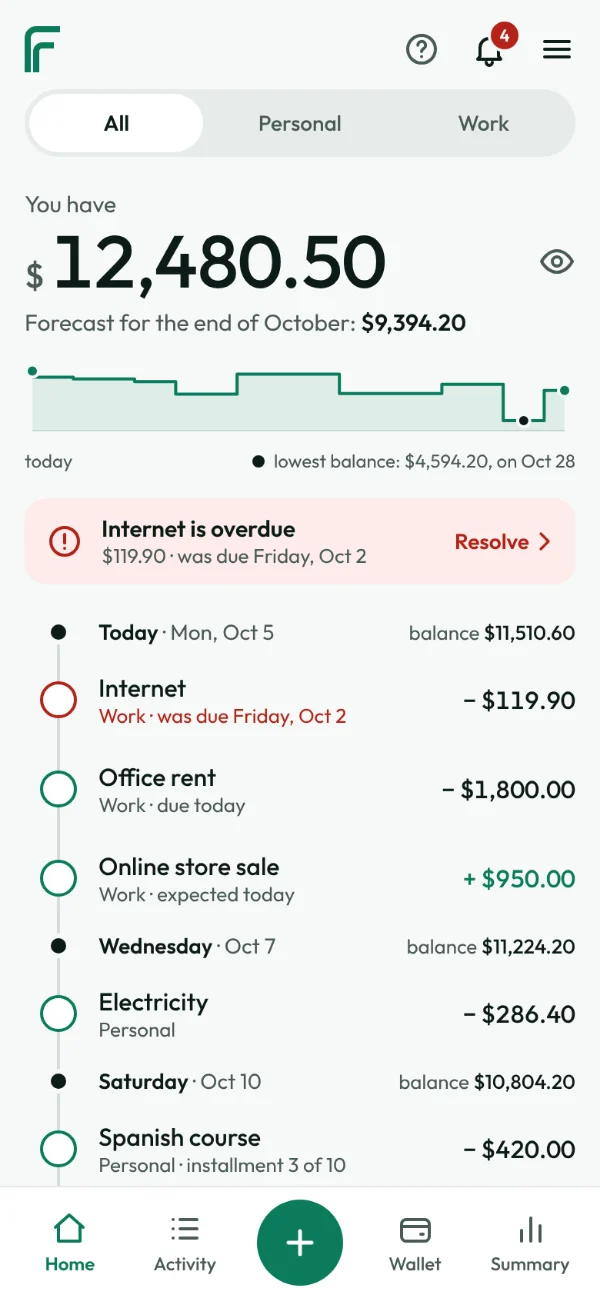
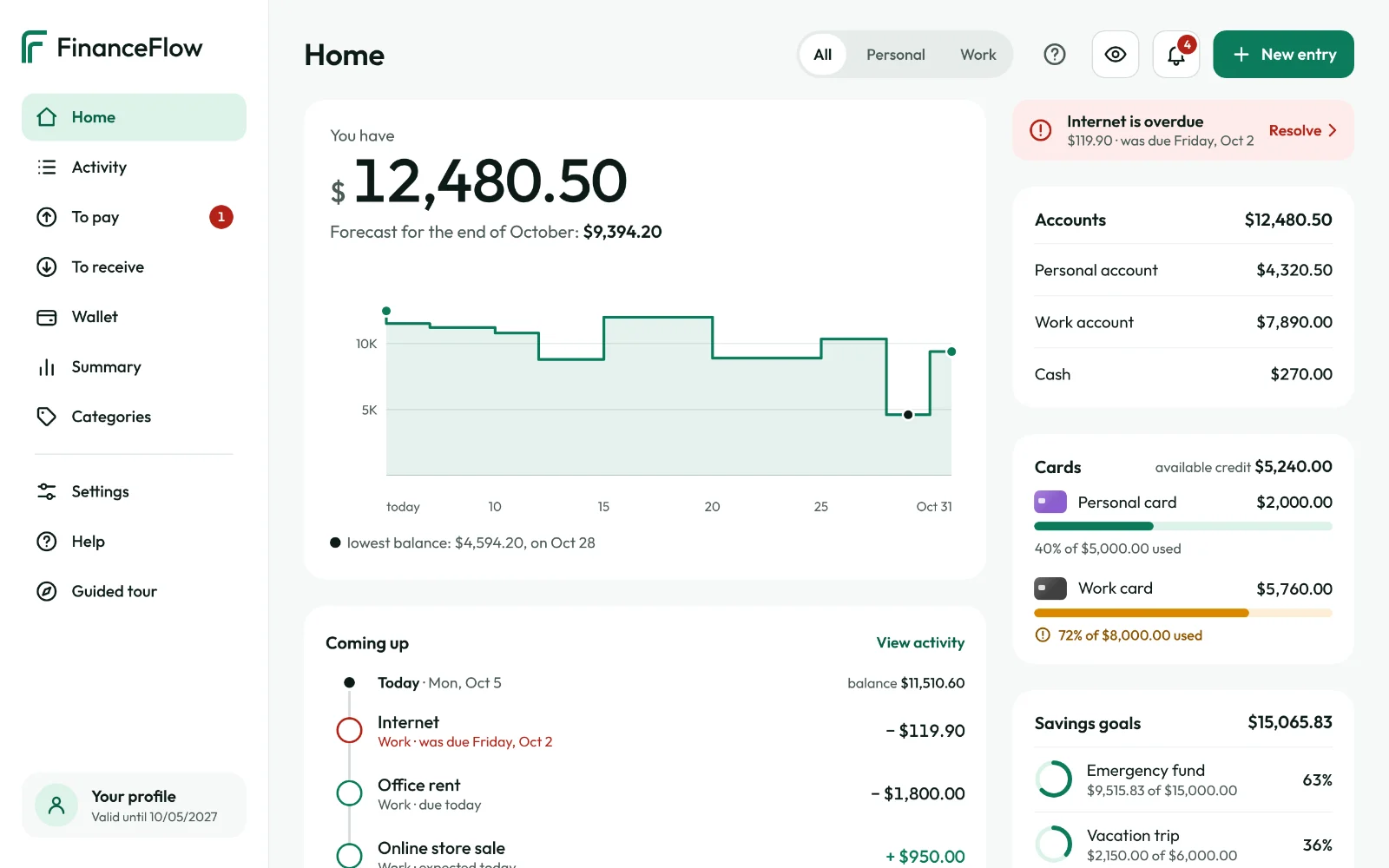
Forecast to the end of the month
What you have today and how much will be left, day by day. If your balance is going to go negative, the app warns you first.
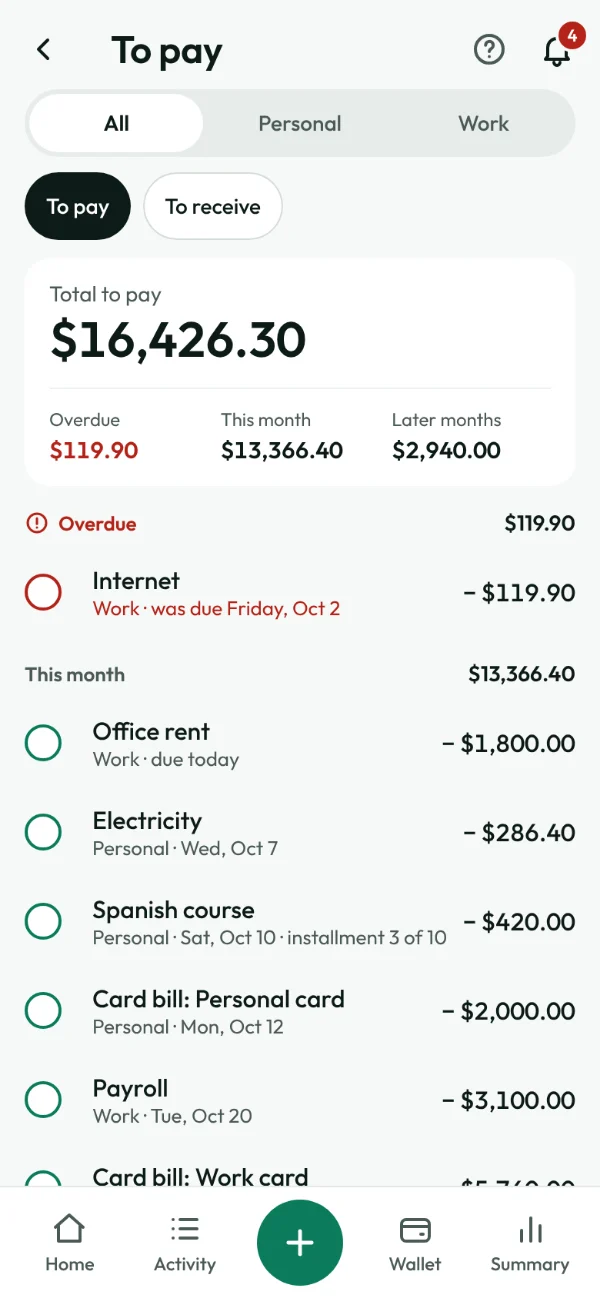
What’s due and what’s overdue
Everything to pay and to receive, overdue first. Paid it? One tap and it’s off the list.
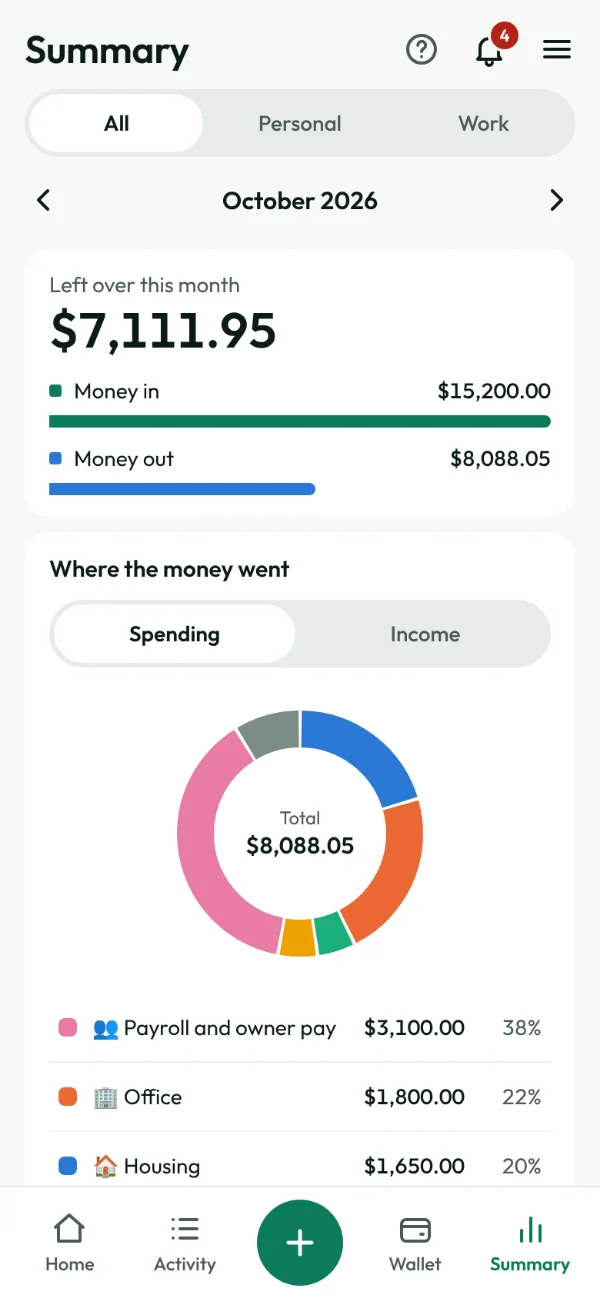
Where the money went
Summary shows how much was left over and a pie chart of your spending. The chart is already made.
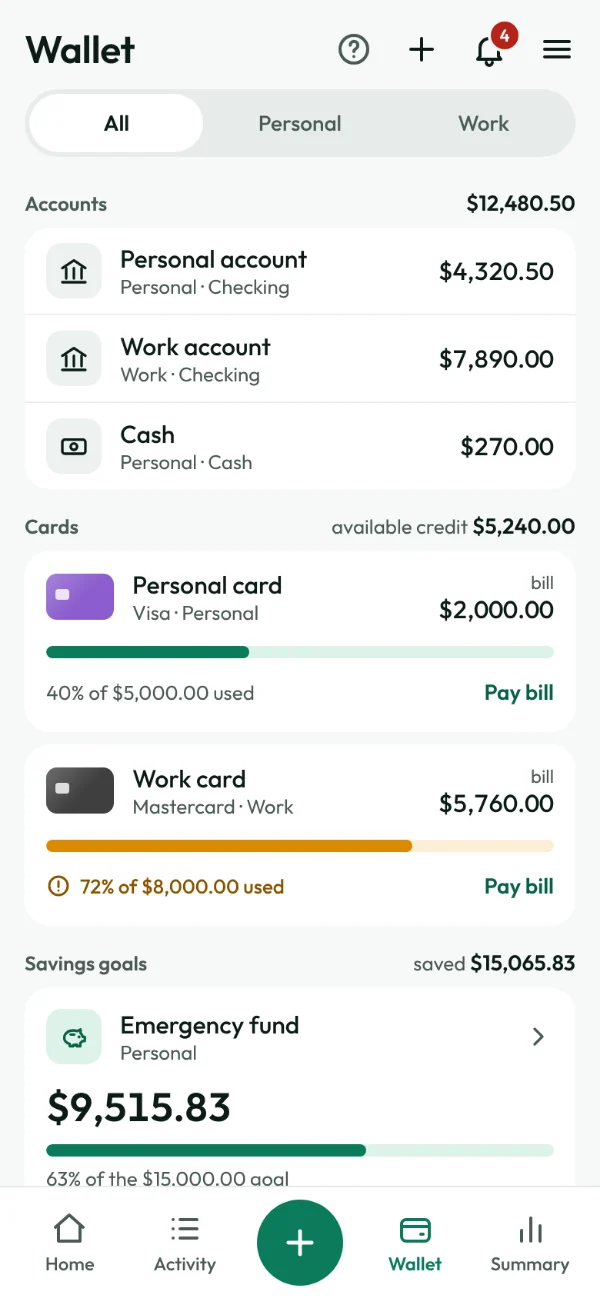
Accounts, cards and savings goals
Each card with its bill and credit used. Each savings goal with its target and what it has earned.
Home and work, kept apart
Mark each entry as personal or work and see both sides of your money together, or one at a time. Good if you freelance, run a small business or just want to know what your work really brings in.
Tap to switch:
And it also comes with
Credit cards
Each card’s bill, the credit used and paying the bill, all worked out for you.
Savings goals that grow
Put money aside for a rainy day, a trip or taxes, with a goal and growth every month.
Alerts on the bell
What’s overdue, what’s due today and the card bill of the day, all in one place.
Hidden amounts
One tap on the eye and amounts turn into dots. Handy when you open the app in public.
Make it yours
Choose the app color, the currency and the language. There are 7 languages.
Help on every screen
A “?” explains each part, and a guided tour shows you around in a minute.
On your phone, on your computer, wherever you are
FinanceFlow opens in the browser and becomes a shortcut on your home screen, like an app, with no store needed. Signed in on another device? Everything is there.
- iPhone and Android
- Windows, Mac and Linux
- The same data on every device
Your money is your business
FinanceFlow is a tool for you to log and keep track. It isn’t a bank and it doesn’t move your money.
Doesn’t connect to your bank
You enter the amounts yourself. The app never asks for a bank password or access to your account.
Only you see your entries
Each account is kept separate from the others. Our team’s panel shows sign-up and subscription details, never your amounts.
No ads, no selling data
You pay for the app. Your data isn’t the product.
One price. Everything included.
No basic plan, no premium plan, no monthly fee.
One-year subscription
R$29.90 per yearabout $10 per yearabout €8.50 per yearabout £7.50 per year
Yes, per year, not per month. That’s less than R$2.50 a month.Yes, per year, not per month. That’s less than $1 a month.Yes, per year, not per month. That’s less than €1 a month.Yes, per year, not per month. That’s less than £1 a month.
- Every feature, nothing sold separately
- Personal and work money
- Phone and computer, with the same data
- No ads
- 7 days to change your mind and get your money back
- Cancel within the period your country’s law guarantees
After you buy, the link to create your password arrives by email.
Sales open soon.
Approximate amount. The exact amount in your currency is shown at checkout.
Frequently asked questions
How long does it take to log an expense?
Seconds. An everyday expense, like $86.40 of groceries, is 9 taps: the +, the amount, who it’s for and Save. The account and the date are already filled in, and the category comes with a name you’ve used before.
Do I need to install anything?
No. FinanceFlow opens in the browser on your phone or computer. If you like, you can add a shortcut to your home screen and it opens like an app, with no store needed.
Does it work on iPhone and Android?
Yes, and on a computer too. Your data lives in your account: sign in on another device and everything is there.
Do I need to connect the app to my bank?
No. You enter the amounts yourself, and it takes seconds. FinanceFlow never asks for a bank password or access to your account.
Can I bring my spreadsheet over?
There’s no import, and you won’t miss it: you add your accounts with today’s balance, which takes a minute, and carry on from there.
Is it good for freelancers and small businesses?
It’s good for keeping work money apart from home money: what came in from clients, your costs and what to set aside for taxes. It doesn’t issue invoices and it doesn’t replace your accountant.
How do I get access?
After you buy, a link to create your password arrives by email. Then just sign in and start.
Do I pay every month?
No. It’s one payment a year: R$29.90. The app lets you know a month before your subscription ends.No. It’s one payment a year: about $10. The app lets you know a month before your subscription ends.No. It’s one payment a year: about €8.50. The app lets you know a month before your subscription ends.No. It’s one payment a year: about £7.50. The app lets you know a month before your subscription ends.
What if I don’t like it?
You have 7 days after buying to change your mind and get your money back.You can change your mind and get your money back within the period your country’s law guarantees for online purchases.
Is my data safe?
It’s encrypted in transit and in storage. Each account can only see its own data, and your password is stored in a way that not even our team can read.
Log your next expense in seconds.
It takes a minute to add your first account. From then on, every entry is a sentence.
R$29.90 per yearAbout $10 per yearAbout €8.50 per yearAbout £7.50 per year One payment, no monthly fee.